
 If you want to read your Yahoo! mails in your Android, you can either use the official mail App or you can use the POP3 option. The advantage of using POP3 is that you can combine your mails from other mail account (e.g. Hotmail) into one inbox! Here is the guide:-
1. Open the email app.
 2. Click on the physical Menu button on your phone to bring up the menu. Select “Add account“.
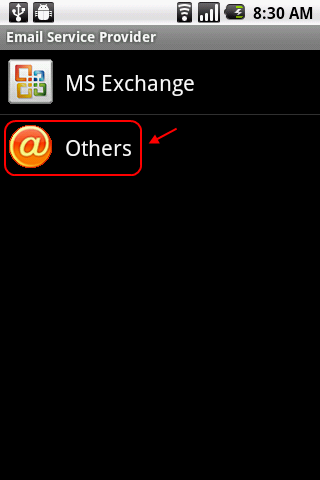
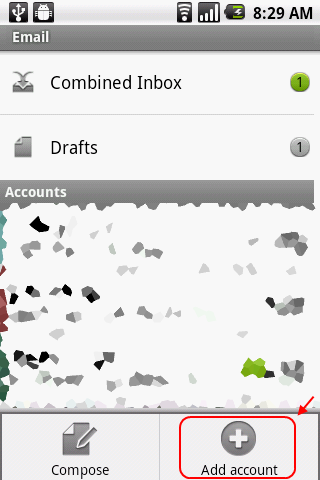 3. In the Email Service Provider screen, select Others.
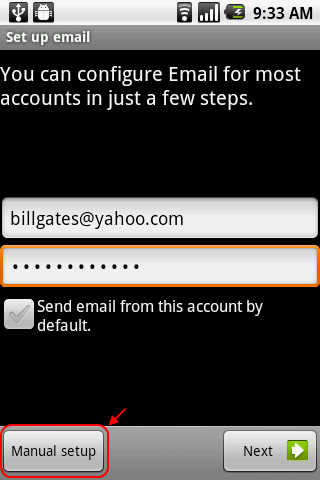
4. Enter your Yahoo! Mail address and password. Check the “Send email from this account by default option” if you want to send email using this account by default. You can click Next and let the mail app to detect the settings. But in this guide, I’ll set it up using the manual method. So, click on “Manual setup” button.
5. In the Incoming server settings screen, fill in your username (full email address) and password. The POP3 server is pop.mail.yahoo.com and the port is 995. For security type, select SSL.
 Depending on your preference, you can either keep the email in the web or delete it after you downloaded the email into your phone.
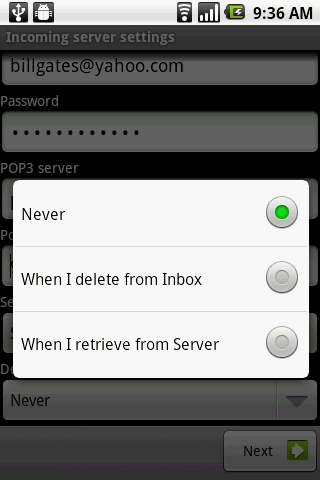 Never – Never delete email in Yahoo! server. (You can still access it from Yahoo! Mail web)
When I delete from Inbox – Delete the email in Yahoo! server when you deleted it in your Android phone.
When I retrieve from Server – Delete the email in Yahoo! server after the email is downloaded into your phone. You won’t be able to view the email in the web anymore!
6. Next, enter the details of the SMTP server. This is the server that you’ll use for sending emails. The SMTP server is smtp.mail.yahoo.com, port is 465, security type is SSL and check the Require sign-in checkbox. Then enter your username (full email address) and password. Click Next.
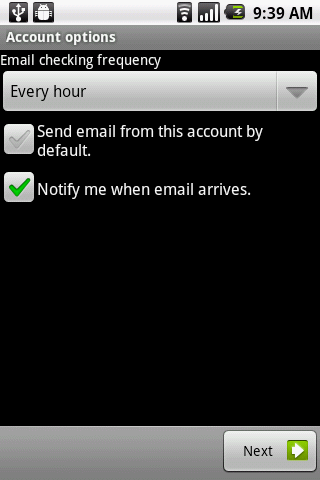
 7. Select the options that fit your preference and click Next.
 8. Give the account a name (this name will show in your Inbox) and the name you want to use when sending email. Then click done.
 9. Now you can read your Yahoo! Mail using your Android smartphone!


Doesn’t seem to work. Comes back with User name or password incorrect. I know both are OK since (a) the yahoo mail app works and (b) mail from my browser works. Any ideas?
Do you have POP enabled for your account? You can follow the guide here:-
http://khimhoe.net/2011/06/11/how-to-enable-pop3-in-the-new-yahoo-mail-updated-11june2011
Pingback: Yahoo Email Acc Einstellungen - Motorola Xoom - Windows Mobile Forum
the only solution to my problem! thanks! works at the first try!
Thank you very much!. Works OK!!
Pingback: ROM ICS 4.0.3 AOSP+ AndroidUser00110001 - Pagina 27 - Forum Android Italiano
Thanks for the excellent instructions! Worked perfectly! Thanks for giving back to help others.
Shawn
nice website.http://www.pisconsulta.com
Thanks – very useful. Is there anyway to import my contacts or would I be better using the Yahoo app?
thanx dude very useful information…
thanx a lot
I have several dupli cate contacts o n android tablet, how can I dellate them
Thanks so much for this info! I’ve been trying and trying, nothing worked. Then I used your port information and it just seemed right. Thanks a lot!
Excellent instructions. Worked first time for me.
In order to have POP access to yahoo, you need to upgrade to Yahoo Plus.
One more thing to pay for….
How come google does not ask for money to access your email on POP?
Not that i love google, for all its nosiness, but srsly.
For those who are having issues successfully SENDING Yahoo! Mail E-Mail from their natively installed Android OS Email app but who are receiving E-Mail just fine in the same app, I recommend doing the following:
Going into Settings > Accounts and Sync and changing the status of Background Data (if it is on, switch it off, and if it is off, switch it on.
If that does not allow you to send, in the Email app, tap Menu > More > Account Settings > Outgoing Settings and ensure that the Outgoing Server Settings read as follows:
smtp.mail.yahoo.com
SSL
465
Of course, also check Require Sign In and provide your Yahoo! Mail credentials. You can also try adding and/or removing the User Name suffix as well (i.e. @yahoo.com)
This is the screen that will confirm if you will be able to successfully send E-Mail or not from within the native Android OS Email app, in that if you receive the message:
Setup could not finish
Cannot safely connect to server. ( java.security.cert.CertPathValidatorException: Trust anchor for the certification path not found.)
then your E-Mail will not successfully send from the native Android OS Email app. However, if upon applying the settings in Menu > More > Account Settings > Outgoing Settings, the settings simply apply, then you will have a small window where you WILL be able to send E-Mail from the native Android OS Email app (be forewarned, this window lasted 2-3 messages for me, upon which point the error then returned.)
I’ve also had luck getting these settings to stick through simultaneously opening the native Android OS web browser and logging on to mail.yahoo.com through there. For some reason, accessing my E-Mail through the web browser followed by then trying to apply the settings in the native Android OS Email app (Menu > More > Account Settings > Outgoing Settings) permitted another small window in which I could send E-Mail from the native Android OS Email app.
My plan of attack through all of this is to read E-Mail using my native Android OS Email app (the sorting options are far richer than the web browser version AND the official Yahoo! Mail app) and to compose E-Mail using the web browser version.
Note that I am currently a Yahoo! Mail Classic user (and will remain one until Yahoo! forces me to change)
Excellent instructions. Worked first time for me
Thanks! I had no idea that process was in my phone…the playstore yahoo apps did not download correctly before.
thanks a lot… it worked out for me!!!!
Pingback: Yahoo Co In Pop3 Settings For Android – Title
This is setting for yahoo.com
pl send setting for yahoo.in
rgds
great it is working
Thank you