[Vista] Lag While Changing Song in WMP11

Windows Media Player 11

Do you face any lagging problem in Windows Media Player 11? While changing the track, it can take up to 5 seconds to change to the next song. To solve this problem, please follow the steps below:

1. Open Start Menu -> Type “Sound” in the search bar -> Select “Sound“.
2. In the “Sound” window, select the “Speakers” and click the “Properties” button at the bottom right.
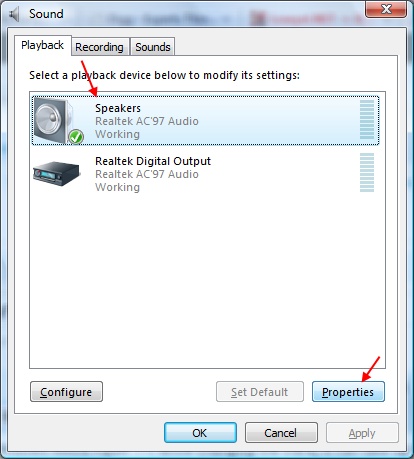
Sound window
3. The “Speaker Properties” window will pop up. Go to the “Enhancements” tab.

Sound properties window
4. Make sure that “Disable all sound effects” option is unchecked.
5. Done!


    Related posts:

    1. Scheduling PC to Hibernate in Vista Scheduling a task is easy in Vista. The new and...
    2. Using POP3 without Deleting Mails in the Web Inbox One of the comments from my previous post on how...
    3. Vista! Yay! I finally got the time to install Microsoft Windows...
    4. [Vista] Unblocking Startup Program Program blocked during startup in Vista? Don’t worry! There are...
    5. Windows Vista SP1 Price Promotion Microsoft is currently having a special promotion for Windows Vista...

    About HMMaster

    I'm just an IT guy working in the IT world. I love to explore new things and the web is the best way to explore!
    This entry was posted in Guide and tagged , , , . Bookmark the permalink.

    Leave a Reply

    Your email address will not be published. Required fields are marked *

    *

    You may use these HTML tags and attributes: <a href="" title=""> <abbr title=""> <acronym title=""> <b> <blockquote cite=""> <cite> <code> <del datetime=""> <em> <i> <q cite=""> <strike> <strong>