

Scheduling a task is easy in Vista. The new and improved Task Scheduler make task scheduling a lot more easier. In this guide, I’ll use the Task Scheduler to schedule my PC to hibernate at a specific time.
Read on for the full guide.
- Before we start scheduling the task, we need to create a batch file. This batch file will contain a command that will send windows into hibernate mode. Paste the following code in a notepad and save it as “hibernate.bat”. Make sure that the file type is “bat” and not “txt”.
shutdown /h
- First, open the Task Scheduler. It is located at Start -> All Programs -> Accessories -> System Tools -> Task Scheduler.
- After you open the Task Scheduler, click on the “Click Basic Task…” option located on the right side of the window.
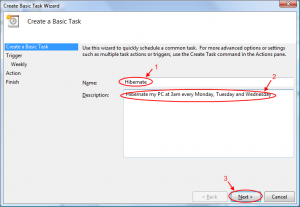
Fill in the name and description of the task
- In the “Create Basic Task Wizard” windows, fill in the name and description of the task.
- Select one of the method that you’ll want the scheduler to execute the task. For my case, I’ll select weekly since I want to execute my task on a weekly basis.
- On the next screen, the will be some options for you to select. This screen will be base on whatever you select on the previous screen. If you selected weekly, you can select the start date and time, how often the task recur and the days the task will be executed.
- Next, there will be 3 options that you can select. Since we are going to schedule the PC to hibernate, we select “Start a program”.
- On this screen, you need to select a program/script that you want to run by the scheduler. Select the batch file that we created earlier and click next.
- Review the details of the task and click Finish.
- You are done! Now the task is scheduled and will execute on the time that you specified in the scheduler. This task will put you PC into hibernate mode on the scheduled time.

Click on the "Click Basic Task..."


Select when you want to start the task

Select the start date of the task

Select "Start a program"

Browse for the batch script that we created earlier

Review the task
Hope this will guide will help you save some electricity by hibernating your PC!

Cool trick, thanks much!
Is it possible to run a task after resume from hibernation (for example run an application). By the way, thanks for the tutorial).
Sorry, but I forgot the question mark:
Is it possible to run a task after resume from hibernation ?
Hi. You can try using this software (I haven’t tested it myself):
http://www.desimonesystems.com/suspendtrigger/index.php
If you make the .bat file a bit more complex, then you can get a fair warning before the shutdown occurs (and give you time to abort).
——————–hibernate.bat——————————
@ECHO OFF
REM
REM This command is run by the Windows Task Scheduler
REM See http://khimhoe.net/2008/09/05/scheduling-pc-to-hibernate-in-vista/
REM Use a \choice\ command to tell you what the system will do in 60 sec
REM w/o user action
choice /T 60 /D y /M \Allow shutdown in 60 seconds? (Enter N or n to stop it)\
IF ERRORLEVEL ==2 GOTO ABORTED
IF ERRORLEVEL ==1 GOTO SHUTDOWN
@echo \Neither error level detected…Should be impossible\
:SHUTDOWN
@echo System is being sent into hibernation mode
time /T
shutdown /h
GOTO END
:ABORTED
@echo System shutdown has been aborted
:END
@echo hibernate.bat completed processing